Syllaby pricing starts at $9 a month and goes up to $153 a month, with four plans and a free trial on each one. But the monthly price is only half the story. Credits decide what you can actually make.
Here’s the problem. You look at the plan page, see a number you like, and sign up. Then you make three videos and your credits are gone. Now you’re stuck paying for a plan that can’t do the job.
That’s the trap. Most posts about this tool just copy the plan prices and stop there. Nobody tells you that one avatar video can eat half a week of credits, or that the numbers on Syllaby’s own page don’t quite match each other.
So this guide gives you the real math. You’ll get every plan, what a credit actually buys, the free trial terms, and the honest downsides before you hand over a card. Let’s get started.
What Is Syllaby Pricing and How Does It Work?
Syllaby pricing is a credit-based system with four paid plans: Starter at $9, Basic at $29, Standard at $78, and Premium at $153 per month. You don’t pay per video. You pay for a monthly credit balance, then spend those credits on scripts, ideas, thumbnails, and video minutes.
That’s the part people miss. Two users on the same plan can get wildly different value out of it.
Think of credits like gas in a tank. A short faceless video sips fuel. An avatar video with a cloned voice guzzles it. Same tank, very different mileage.
So the right way to read syllaby pricing isn’t “which plan is cheapest.” It’s “how many videos do I need each month, and which tank covers that?”
Syllaby Pricing Plans and Costs Right Now
Here’s the full syllaby pricing breakdown, straight from the official page.
| Plan | Per month | Credits | Faceless videos | Voice clones | Storage |
|---|---|---|---|---|---|
| Starter | $9 | 100 | about 7 | None | 1 GB |
| Basic | $29 | 500 | about 38 | 1 | 5 GB |
| Standard | $78 | 1,500 | about 115 | 3 | 10 GB |
| Premium | $153 | 5,000 | about 384 | 5 | 20 GB |
A few things worth knowing about this table.
Starter is monthly only. You can’t get it on an annual deal. It also gives you no voice clones and no characters, so it’s really a “look around” plan.
Annual billing knocks about 15% off. Basic drops to $24.67 a month ($296 up front). Standard drops to $66.33 ($796). Premium drops to $130.08 ($1,561). Syllaby says that saves you $52, $140, and $275 a year in that order.
Every plan includes the same tools. All the AI models, the video editor, thumbnails, the content calendar, bulk scheduling, full-resolution export, and unlimited video length. You’re not buying features. You’re buying volume.
There’s also a lifetime option that pops up as a limited deal around $799 once for Basic-level credits forever, or $3,999 for Premium-level. It comes and goes, so check whether it’s live before you count on it.
How Syllaby Credits Actually Get Spent
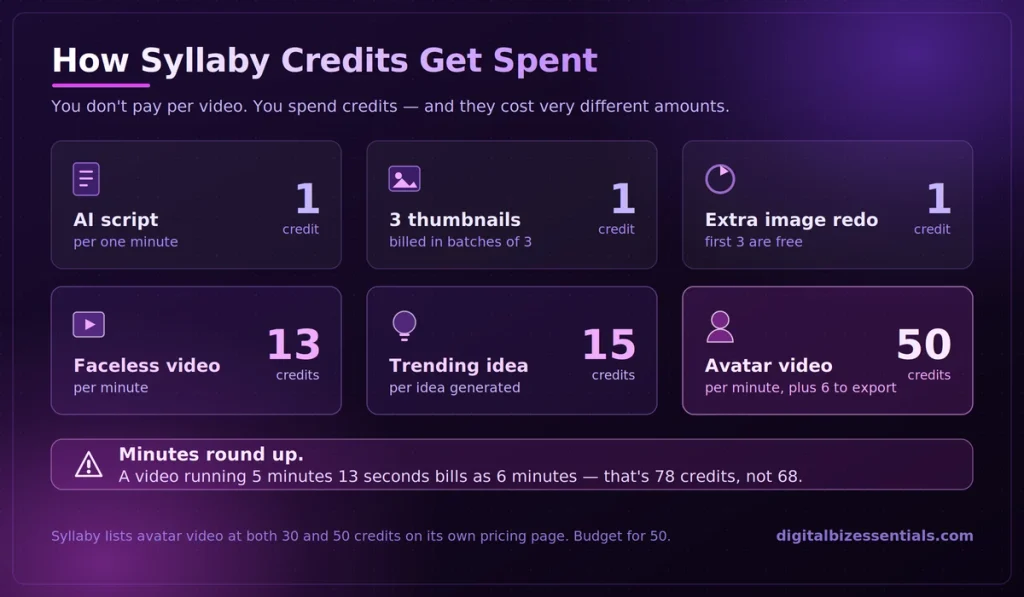
This is the section the directory sites skip, and it’s the one that decides whether syllaby pricing is a good deal for you.
Here’s the published rate card:
- AI script (one minute): 1 credit
- Thumbnails: 1 credit per 3 thumbnails
- Image regeneration: first 3 free, then 1 credit each
- Faceless video: 13 credits per minute
- Trending idea: 15 credits per idea
- Avatar video: 50 credits per minute, plus 6 credits per minute to export
Two warnings on this.
First, minutes round up. A video that runs 5 minutes and 13 seconds bills as 6 minutes. So 6 × 13 = 78 credits, not 68.
Second, Syllaby’s own page lists two different avatar prices. The plan comparison box shows 30 credits for an avatar video, while the FAQ further down the same page says 50 credits per minute plus 6 to export. The faceless number (13 per minute) is consistent in both spots, so treat that one as solid and budget high on avatars until support confirms it.
Run your own math before you pick. Four one-minute faceless videos a week is roughly 52 credits weekly, or about 208 a month. Basic covers that with room to spare. Starter does not.
Which Syllaby Pricing Plan Fits You? 4 Easy Steps
Don’t guess. Work through these four steps and the answer picks itself.
Step 1: Count your videos. How many do you honestly need per month? Not the number you wish for. The number you’ll actually publish.
Step 2: Multiply by 13. That’s your faceless video credit load per minute of finished video. Add 1 more credit per minute for the script.
Step 3: Decide if you need your own voice. Voice cloning only starts on Basic. If you want your face or voice on camera, you’re looking at avatar videos, and those cost three to four times more per minute.
Step 4: Add 20% headroom. Regenerated images, extra thumbnails, and rounded-up minutes all add up. Give yourself a buffer.
Run those numbers and most solo creators land on Basic. Agencies and anyone posting daily land on Standard or Premium.
You can test the whole thing before you pay a cent start your free Syllaby trial here and burn some credits on a real video first: Start your free Syllaby trial (A card is required, so set a phone reminder to cancel before day 7 if it’s not for you.)
Not sure which plan you need? Don’t buy blind. Start the free trial, make one real video, and watch how fast your credits move. That single test tells you more than any pricing table can. Try Syllaby free
Tips to Stretch Your Syllaby Pricing Plan
Whatever tier you land on, these habits make your syllaby pricing plan go further.
Keep videos short. Since minutes round up, a 59-second video costs 13 credits and a 61-second video costs 26. Trim your scripts.
Write your own ideas. Trending idea generation costs 15 credits a pop — more than a full minute of video. If you already know what to post, skip it.
Batch your thumbnails. They’re billed 3 at a time, so generating 3 costs the same as generating 1.
Don’t over-regenerate images. You get 3 free tries per image. After that it’s a credit each, and they add up fast on a long video.
Use up your credits. They don’t roll over. Whatever you don’t spend by the end of your billing cycle disappears, even on annual plans.

Syllaby Pricing Mistakes to Avoid
Being honest here matters more than making a sale, so here are the real problems people run into with syllaby pricing.
- Assuming the trial is hands-off. It isn’t. You put a card down, and it converts to a paid plan when the trial ends. Set a reminder the day you sign up.
- Cancellation friction. Independent reviews on Trustpilot put Syllaby around 3.7 out of 5, and a big share of the low ratings are about billing and how hard people found it to cancel. Cancel early in the trial, not on the last day, and keep your confirmation email.
- Buying Starter and expecting a business. Seven short videos a month with no voice clone won’t build a channel. If Starter is your budget, use it to test, then decide.
- Forgetting the refund window. Syllaby’s stated policy is refunds requested up to 30 days after payment. If you get charged and you’re unhappy, act quickly rather than waiting.
- Paying annually before you’ve tested. The 15% saving is real, but so is being locked into a year of a tool you haven’t used yet. Do a month of monthly first.
None of that means the tool is bad. It means you should go in with your eyes open and a calendar reminder set.
Is There a Syllaby Free Trial?
Yes. Every tier in the syllaby pricing lineup comes with a free trial, and you can cancel during the trial with no obligation. The trial is widely listed as 7 days, though Syllaby doesn’t print the length on its main plan page, so confirm the current terms at checkout.
[Image with alt text: syllaby pricing page] Image: Syllaby official site.
Two important details. A payment method is required to start, and several users report being billed after they believed they had cancelled. That’s the single most common complaint about this tool.
So do this: sign up, set a reminder for day 5, and make at least three real videos before you decide. You’ll know by then.
You can see the current plans and any live discounts on the official Syllaby pricing page.
Frequently Asked Questions
How much does Syllaby cost per month? Syllaby pricing runs $9 a month for Starter, $29 for Basic, $78 for Standard, and $153 for Premium. Annual billing cuts roughly 15% off Basic, Standard, and Premium. Starter is available on monthly billing only.
Is Syllaby free? No. There’s no permanent free plan. Syllaby offers a free trial so you can test the tool, but you’ll need a paid plan to keep using it after the trial ends.
How many videos can I make with Syllaby? It depends on length. A one-minute faceless video costs 13 credits, so Basic’s 500 credits work out to roughly 38 one-minute videos a month. Premium’s 5,000 credits stretch to about 384.
Do Syllaby credits roll over? No. Unused credits expire at the end of each billing cycle and don’t carry into the next month. That’s true on annual plans too, so pick a plan you’ll actually use.
Can I get a refund from Syllaby? Yes. Syllaby’s stated policy allows you to request a refund up to 30 days from the date of payment by emailing their customer request address or using the contact form on their site.
Final Thoughts
Syllaby pricing is simple once you stop looking at the monthly number and start looking at credits. Count your videos, multiply by 13, add a buffer, then pick the plan that covers it.
For most solo creators that’s Basic at $29. For agencies and daily posters it’s Standard or Premium. Starter is a test drive, not a business plan.
If you’re weighing this against other AI content tools, our roundup of ad creative services covers the wider market, and our marketing platform comparison is worth a look if you need scheduling and CRM in the same place.
The smart move is to test before you commit. The trial costs nothing if you cancel in time.
Start your free Syllaby trial (Card required — set a reminder to cancel before the trial ends.)
Read next: Syllaby Review: 9 Ways Creators Save Time With AI Content
Some links on this page are affiliate links. We may earn a commission if you buy through them, at no extra cost to you.