Yes, you can build AdCreative AI Facebook ads in about 20 minutes. You add your logo and colors, pick the Meta size, and the AI hands you finished image ads with copy and a score on each one.
Here’s why that matters. Making Facebook ads by hand is slow. You open a design tool, stare at a blank screen, and lose an hour to one square image.
So most small business owners run one tired ad for months. It stops working. Costs climb. And you never find out if a different picture or headline would have doubled your clicks, because you never had time to make one.
This guide fixes that. You’ll learn what AdCreative AI Facebook ads are, what the tool does, the 7 steps to make your first batch of ads, the mistakes that burn your credits, and what it really costs. Let’s get started.
What Are AdCreative AI Facebook Ads?
AdCreative AI Facebook ads are ad images, videos, and copy made by AdCreative.ai in Meta’s exact sizes. You add your logo, colors, and offer. The AI generates dozens of options, scores each one for likely conversions, and lets you download the winners to upload into Facebook Ads Manager.
AdCreative AI Facebook ads are not a Facebook plugin, and the tool does not run your campaigns for you. Think of it as a very fast designer who works in the background.
You feed it your brand. It gives you ad after ad, sized right for Feed, Stories, and Reels. You can also connect your Facebook and Google ad accounts so the results are shaped around your own data.
Then you take the files you like into Ads Manager and launch. That last part is still on you.
Why AdCreative AI Facebook Ads Beat Doing It by Hand
Here’s what changes when the AI does the drawing:
- Speed. One batch gives you ten looks at your offer instead of one.
- Right sizes, every time. No more guessing what fits a Story versus a Feed post.
- A score before you spend. Each creative gets a predicted conversion number, so you test your best guess first, not your favorite guess.
- Copy comes with it. Headlines and ad text are generated next to the image.
- You only pay when you download. Generating creatives is unlimited — credits are spent when you download the ones you want.
That last point is the one people miss. Generate a hundred. Download five. You still spent five credits.
If you want the wider view of what else is out there, we compared the field in our roundup of ad creative services.
What You Need Before You Start
Not much. Grab these four things first and your AdCreative AI Facebook ads come together fast:
- Your logo — a PNG with a clear background works best.
- Your brand colors — two hex codes is plenty.
- One sentence about your offer — what you sell and who it’s for.
- A product photo or two — optional, but real photos beat stock every time.
Have those in one folder before you sign up. The 7-day clock starts the moment you make the account, so don’t waste day one hunting for your logo file.
How to Make AdCreative AI Facebook Ads in 7 Easy Steps
Step 1: Start your free trial
Sign up and you get a 7-day free trial with 10 free credits to download creatives for your campaigns. A card is required to turn it on, and you’re not charged until the week ends.
Right now you’re paying a freelancer or losing evenings to Canva. In a week you could have twenty tested ads. The trial is the bridge.
You can start your free AdCreative.ai account here: AdCreative.ai free trial set a phone reminder for day 6 to cancel if it’s not for you.
Step 2: Build your brand profile
Upload the logo. Drop in your colors. Write your one-sentence description.
This is the step people rush, and it shows in every ad afterward. Five careful minutes here means every creative comes out on-brand instead of generic.
Step 3: Connect your Facebook ad account
Link Meta in the integrations screen. Connecting your ad account lets the AI look at which of your creatives actually perform and tailor what it makes next.
Skip this if you’ve never run an ad. There’s no data to learn from yet. Come back after your first campaign.
Step 4: Pick the Facebook sizes you need
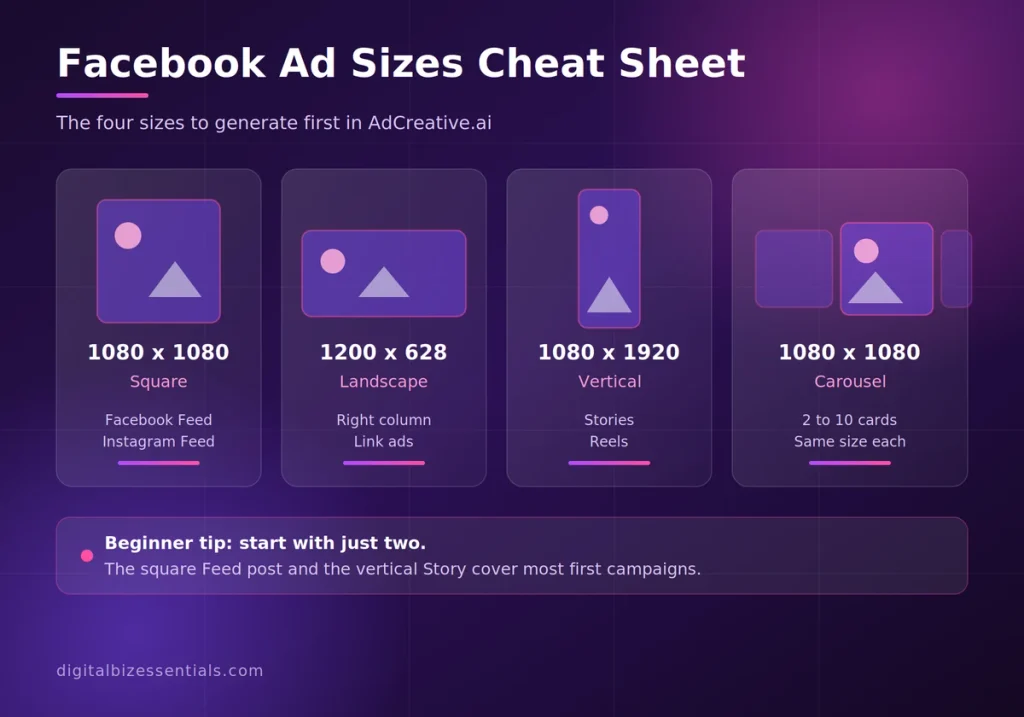
The platform offers social sizes for Facebook, Instagram, LinkedIn, and display the square post size is the one built for Facebook and Instagram feeds.
Start with two: the square Feed post and the tall Story. Those two cover most beginner campaigns.
Step 5: Generate a big batch

Hit generate and let it run. This is where AdCreative AI Facebook ads earn their keep, so don’t stop at the first screen.
Remember, generating is free. Only downloads cost credits. So scroll through everything before you pick.
Look at each creative’s predicted score. Sort by it. Your eye and the data will disagree sometimes — with ten credits to your name, follow the data.
Step 6: Fix the text
The AI writes headlines and ad copy for you. Read them out loud before you accept them.
Cut anything that sounds like a robot wrote it. Swap in the exact words your customers use. Ten seconds of editing here lifts click-through more than a new picture will.
Step 7: Download the winners and launch
Pick your top three or four. Download them — that’s when the credits go.
Then open Facebook Ads Manager, make one campaign, and load all of them into a single ad set. Let Meta find the winner for you over three or four days.
Tips to Get More From AdCreative AI Facebook Ads
A few small habits make a big difference here.
Test one thing at a time. Same headline, four images. Now you know if it’s the picture.
Save your favorites before you download. Favoriting costs nothing. It keeps your shortlist alive while you decide.
Use real product photos. AI backgrounds look clean. Real gear looks trustworthy. Facebook shoppers can tell.
Write the offer, not the feature. “Free shipping today” beats “premium quality materials” almost every time.
Give each ad four days. Meta needs time to learn. Killing an ad after twelve hours tells you nothing.
Common Mistakes to Avoid (and the Honest Downsides)
AdCreative AI Facebook ads are simple, but a few slips cost real money. I’d rather you know these now than on day 8.
- Downloading everything on day one. Ten credits go fast. Download only what you’ll actually run.
- Forgetting to cancel. The trial needs a card. No reminder, no refund story — put it in your phone now.
- Expecting video on the cheap plan. Video ads and storytelling formats sit on the higher tiers. If video is your whole plan, this may not be your tool.
- Treating the score as a promise. It’s a prediction from past data. Your audience still gets the final vote.
- Thinking it launches your ads. It makes the files. You still upload and manage them in Ads Manager yourself.
Who should skip it? If you run one ad a quarter, the monthly fee won’t pay for itself. Canva and a good photo will do. This tool earns its keep when you’re testing often. Our full AdCreative.ai review breaks that call down further.
How Much Does AdCreative.ai Cost? Is There a Free Trial?
There’s a free trial: 7 days and 10 credits, with full feature access during the week. A card is needed to start it, and no charge lands until the trial ends.
After that, AdCreative AI Facebook ads run on credits. Entry plans start in the $29–$39 a month range for around 10 download credits, and prices climb into the hundreds for the multi-brand and video tiers. Yearly billing cuts the monthly number a lot, and the company runs seasonal sales on top of that.
Because those promos move so often, check the live number on the official AdCreative.ai site before you commit. Don’t take my figure or anyone else’s as gospel on a page that changes monthly.
One thing worth knowing: refunds are offered in the first 7 days on monthly plans and 30 days on yearly plans, as long as you haven’t generated or downloaded anything. So once you start making creatives, that door closes.
Ready to see your own ads? Start the free trial, build your brand profile, and generate your first batch of Facebook creatives tonight. Ten credits is enough to launch a real test. Just set a reminder to cancel before day 7 if it isn’t a fit. Start your free AdCreative.ai trial
Frequently Asked Questions
Can AdCreative.ai make ads for Facebook? Yes. AdCreative AI Facebook ads come out in Meta’s standard sizes for Feed, Stories, and Reels. You download the files and upload them in Facebook Ads Manager. It creates the ads but does not run the campaigns.
Is AdCreative.ai free? No, but there’s a 7-day free trial with 10 credits and full feature access. A credit card is required to start it. Cancel before the week is up and you pay nothing.
Does AdCreative.ai connect to Facebook Ads Manager? It connects to your Meta ad account so the AI can study which creatives perform for you. It is not a bulk campaign launcher, so you still build and publish campaigns inside Ads Manager.
How many credits does one Facebook ad cost? Credits are spent on downloads, not on generating. Generate as many as you want for free, then spend one credit per creative you download. Ten trial credits gets you a full first test.
Is AdCreative.ai worth it for a small business? AdCreative AI Facebook ads are worth it if you test often and your creative is the bottleneck. If you run one ad every few months, the monthly cost is hard to justify — a free design tool will cover you.
Final Thoughts
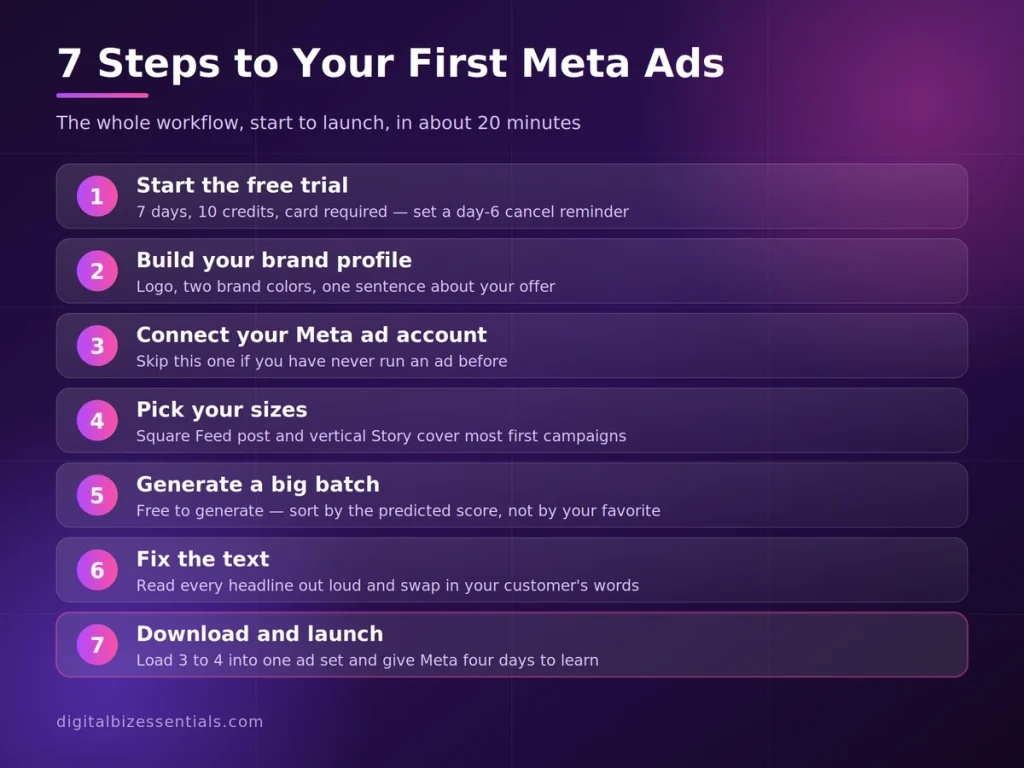
AdCreative AI Facebook ads come down to seven steps: start the trial, build your brand, connect Meta, pick your sizes, generate a big batch, fix the copy, download the winners.
The real win isn’t prettier pictures. It’s volume. Ten ads tested beats one ad guessed, every single time.
Ten credits and seven days is a cheap way to find out if that’s true for your business. If it isn’t, you cancel and you’re out nothing.
Start your free AdCreative.ai trial → remember to set that day-6 cancel reminder.
Read next: AdCreative AI Free Trial: 7 Easy Steps to Avoid Regret
Some links on this page are affiliate links. We may earn a commission if you buy through them, at no extra cost to you.