LiveChat vs Tidio comes down to one fact: Tidio has a free plan and bills you by conversation, while LiveChat has no free plan and bills you per person. Low chat volume, pick Tidio. Busy site or a real team, pick LiveChat.
Here’s the problem. You added a chat box to sell more. Now you’re staring at two pricing pages that count two completely different things.
One counts your staff. One counts your chats. Get it wrong and you either slam into a limit in week two or pay for seats nobody uses. Both hurt.
This guide gives you the real numbers from both official pricing pages, the traps hiding in each one, and a 7-step way to pick in about ten minutes. Let’s get started.
What Is the LiveChat vs Tidio Difference?
LiveChat vs Tidio is a choice between two pricing models. LiveChat charges per agent, from $19 per person each month, with unlimited chats and no free plan. Tidio starts at $0 and charges by billable conversation, from $24.17 a month. Your chat volume decides which one costs less.
Both tools do the same core job. A chat bubble sits on your site. Someone asks a question. You answer, and they buy instead of bouncing.
The split is in the meter. LiveChat counts seats and lets chats run wild. Tidio counts conversations and hands you ten seats on nearly every plan.
That one difference settles LiveChat vs Tidio faster than any feature list ever will.
Why the LiveChat vs Tidio Choice Matters
Pick the wrong meter and you feel it fast. Here’s what’s really at stake:
- Your bill can double. Both tools sell AI as a paid add-on. The sticker price is not the real price.
- Limits stop your chats. Run out of Tidio conversations mid-month and you’re stuck. Run out of LiveChat seats and you pay another $19 to $79.
- One of them is free to test forever. The other gives you 14 days.
- Switching later is a pain. Chat history, saved replies and widget settings do not move between tools.
- Your answer speed makes the sale. Whichever you pick, the win is replying before the visitor leaves.
What You Need Before You Compare LiveChat vs Tidio
You don’t need much. Grab four numbers first:
- Chats per month. Guess from your inbox or contact form. Even a rough number works.
- People who will reply. Just you? Two? Five?
- Your channels. Website only, or Instagram, Messenger and WhatsApp too?
- Your AI plan. Do you want a bot answering the boring questions, or will you reply yourself?
With those four, the LiveChat vs Tidio answer usually picks itself.
How to Decide LiveChat vs Tidio in 7 Easy Steps
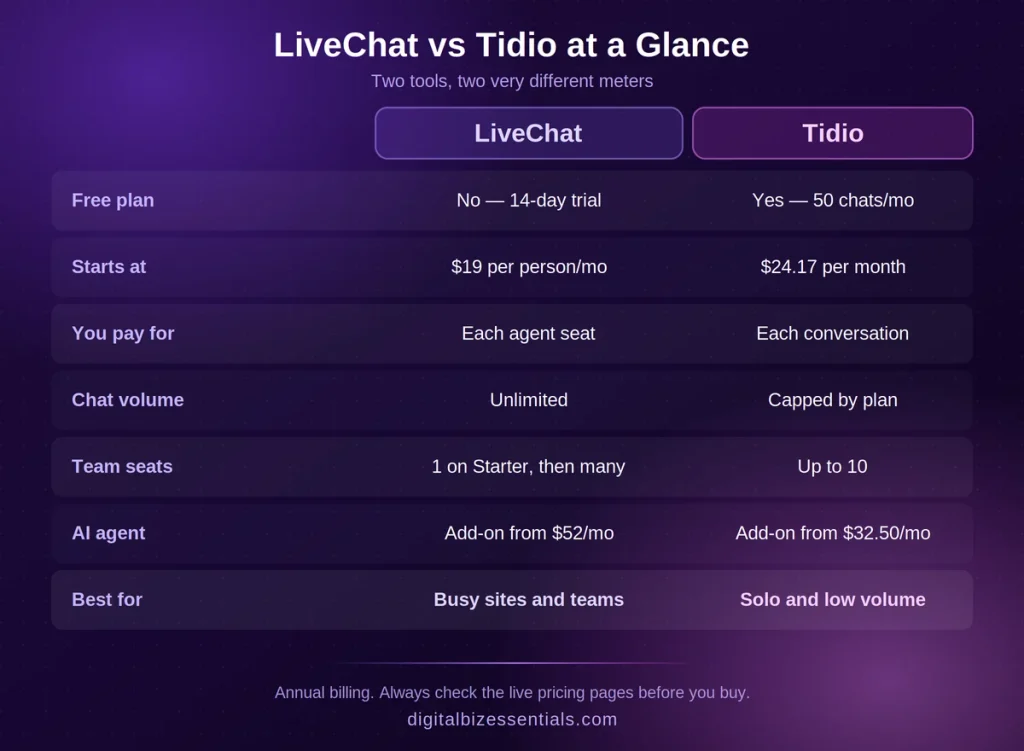
Step 1: Count your monthly chats
Under 50 real conversations a month? Tidio’s free plan covers you. Over 250 and climbing? Per-seat pricing starts looking a lot cheaper.
Step 2: Count your seats
This is the LiveChat trap. Starter is one user only. The second you add a teammate, you jump to $49 per person. Tidio gives you up to 10 seats on its self-serve plans.
Step 3: Price the AI properly
Neither tool includes a real AI agent in the base price. LiveChat sends you to ChatBot.com, which starts at $52 a month. Tidio’s Lyro agent starts at $32.50 a month after your first 50 free conversations run out.
Step 4: Check your channels
Tidio pulls Instagram, Messenger, WhatsApp and email into one inbox out of the box. LiveChat covers website, apps, Messenger and Apple Messages, with the rest through its marketplace.
Step 5: Do the honest math
Write it down: base plan + AI add-on + branding removal + extra seats. Do it for both. The winner is usually obvious once it’s on paper, and it’s often not the cheaper sticker.
Step 6: Test both for free
Open a Tidio free account. Start the LiveChat trial. Put both widgets on your site for a week and see which inbox you actually enjoy opening.
Step 7: Commit and set a reminder
Annual billing saves real money on both. Only lock it in after your test week. If you’re on a trial, set a phone reminder for day 12 so you decide on purpose, not by accident.
Tips to Get the Most From LiveChat vs Tidio
Answer in under a minute. Speed beats every feature on both platforms.
Write five canned replies. Shipping, refunds, pricing, hours, “can I book a call.” That’s most of your chats handled.
Turn on one proactive message. Trigger it on your pricing page only. Don’t nag people on every page.
Put it on your phone. Both have mobile apps. A chat you miss is a sale you miss.
Check your numbers monthly. Chats, conversion, response time. If nothing moved after a month, change the greeting before you change the tool.
Common LiveChat vs Tidio Mistakes to Avoid
Here’s the honest side. Both tools have real downsides:
- LiveChat has no free plan. You get 14 days, then you pay. If your budget is truly $0, this isn’t your tool.
- LiveChat Starter is one seat. Great solo. The moment you hire, your cost jumps hard.
- Tidio’s free plan is small. Fifty billable conversations a month goes quicker than people expect on a busy store.
- Tidio’s AI is not really free. Your first 50 Lyro conversations are a one-time pool, not monthly. After that it’s a paid add-on.
- Tidio branding costs extra to remove on Growth, as a separate monthly add-on.
- Both cap something. LiveChat caps visitor tracking by plan. Tidio caps self-serve accounts at 10 agents.
- Buying on features alone. You’ll use maybe six of them. Buy on volume and seats.
Who should skip both? If you want chat bundled with your CRM, funnels and email in one bill, a chat-only tool is the wrong shape. Our GoHighLevel alternatives comparison covers the all-in-one route instead.
How Much Do LiveChat and Tidio Cost? Is There a Free Plan?
The LiveChat vs Tidio prices below come straight from the official pricing pages, billed annually. Always check the live page before you buy, because offers move.
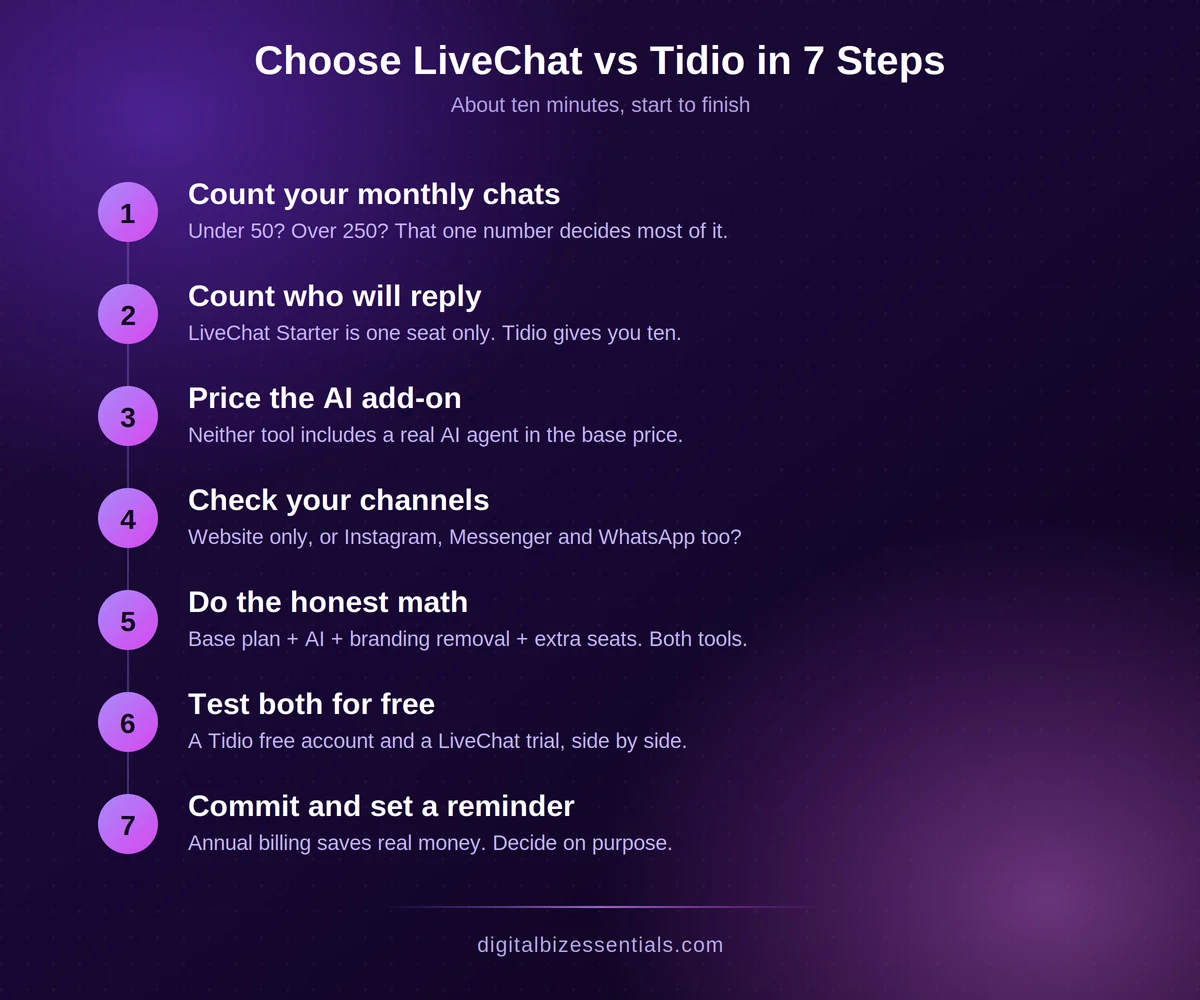
LiveChat has no free plan. It runs a 14-day free trial with no credit card, then:
- Starter — $19 per person/month. One user, 60-day chat history, track up to 100 visitors.
- Team — $49 per person/month. Unlimited users, unlimited chat history, basic reporting.
- Business — $79 per person/month. Advanced reporting, work scheduler, staffing prediction, SMS.
- Enterprise — custom pricing.
- AI chatbot comes from ChatBot.com and starts at $52 a month on top.
See the full breakdown on the official LiveChat pricing page.
Tidio does have a free plan, plus a 7-day trial of everything with no credit card:
- Free — $0. 50 billable conversations a month, up to 10 seats, 50 one-time Lyro AI conversations.
- Starter — $24.17/month. 100 billable conversations, live visitor list, operating hours.
- Growth — from $49.17/month. From 250 conversations, advanced analytics, permissions, macros.
- Plus — from $300/month plus usage.
- Add-ons: Lyro AI from $32.50/month, Flows from $24.17/month, branding removal $16.67/month.
Check the current tiers on the official Tidio pricing page.
One nice touch: Tidio only counts a conversation as billable when a human on your side replies. Bot answers don’t burn your quota.
Frequently Asked Questions
Is Tidio better than LiveChat? For a solo owner with light chat volume, yes. Tidio’s free plan and 10 included seats are hard to beat at $0. For a busy site or a support team, LiveChat’s per-seat model with unlimited chats usually costs less and scales cleaner.
Does LiveChat have a free plan? No. LiveChat offers a 14-day free trial with no credit card required, then paid plans start at $19 per person per month billed annually. There is no free forever tier.
Is Tidio really free forever? Yes, the free plan is permanent. It covers 50 billable conversations a month and up to 10 seats. The AI agent gives you 50 conversations one time only, not every month, so plan for that.
Which is cheaper, LiveChat or Tidio? It depends on volume. Under about 100 conversations a month, Tidio is cheaper. Past a few hundred conversations, LiveChat’s flat per-agent price often wins because chats are unlimited on every plan.
Can I switch from Tidio to LiveChat later? Yes. You swap the widget code on your site and you’re live. Your old chat history, saved replies and widget settings stay behind, so export anything you need first.
Final Thoughts
The LiveChat vs Tidio decision is not really about features. Both send messages, both have apps, both work on WordPress and Shopify.
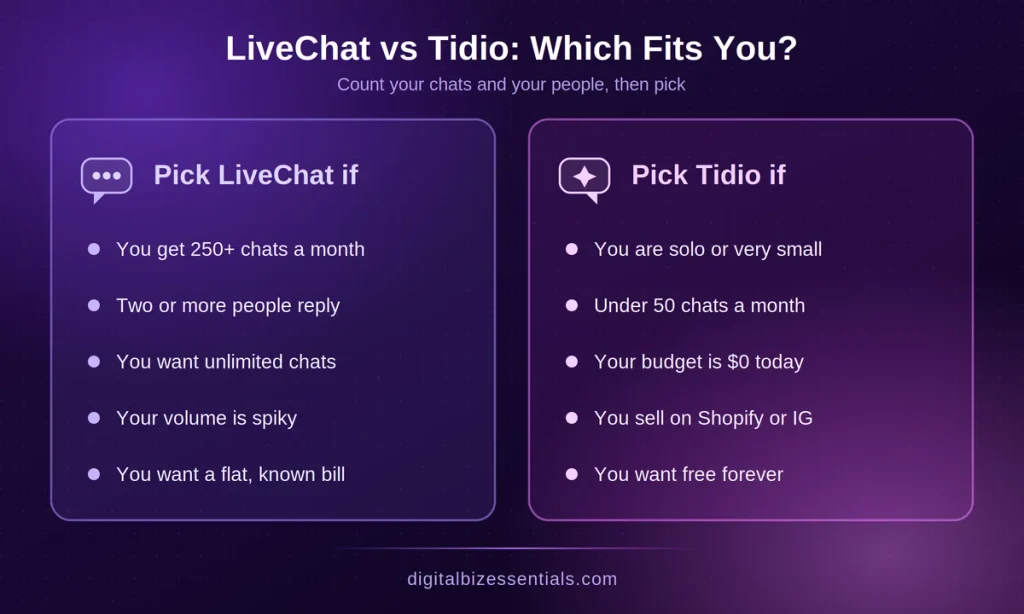
It’s about the meter. Tidio bills your conversations, LiveChat bills your people. Count your chats, count your seats, price the AI add-on, then pick.
If you’re solo and quiet, take Tidio’s free plan. If chat is about to become a real part of how you sell, and you want unlimited conversations for a flat price per person, LiveChat is the safer bet. Fourteen days costs you nothing but a calendar reminder.
You’ve got the numbers. Now go see which inbox feels right. Try LiveChat free for 14 days – no credit card
Read next: LiveChat Software: Stop Losing Sales in 7 Slow Seconds and if you’re ready to test it, here’s the step-by-step LiveChat free trial walkthrough.
Some links on this page are affiliate links. We may earn a commission if you buy through them, at no extra cost to you.