The LiveChat free trial is the cheapest way to find out if a chat box will make you money. Right now, people land on your site, get one small question stuck in their head, and leave.
That hurts. You paid for those clicks. You wrote that page. Then the sale walks out the door over a question you could have answered in ten seconds.
Here’s the fix. In this guide you’ll learn what the LiveChat free trial gives you and how to set it up in 7 smart steps. No code skills. No credit card. Just a chat box on your site by tonight. Let’s get started.
What Is the LiveChat Free Trial?
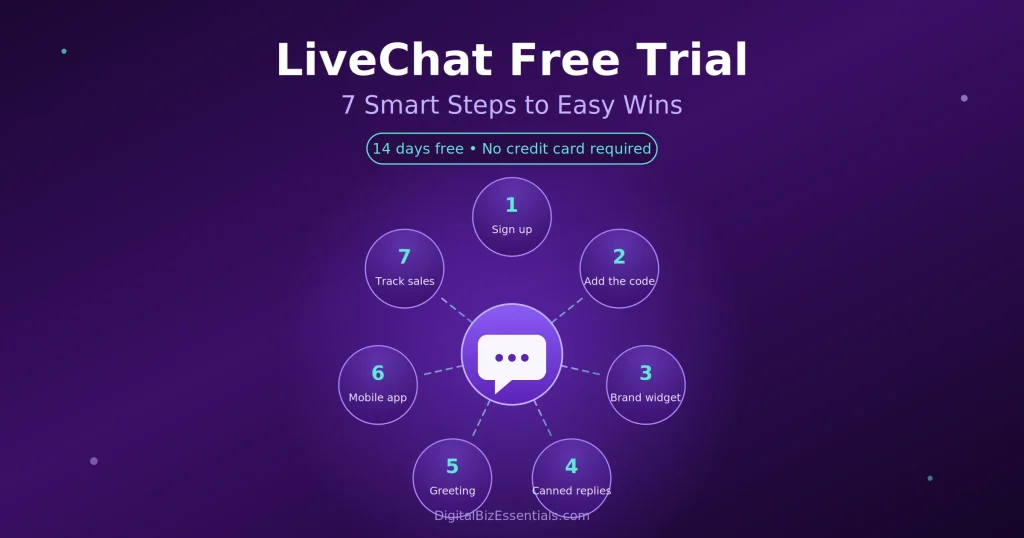
The LiveChat free trial is a 14-day test of the full LiveChat app. You get the chat widget, the reports, and the AI features with no credit card needed. You add a short code to your site, chat with real visitors, and decide at the end whether you want to pay.
Think of it as a two-week audition. The tool sits on your site and does the job. You watch what happens.
You are not locked in. Because you never hand over a card, nothing renews by surprise. If you do nothing at day 14, the chat box simply switches off.
That is a fair deal. You risk two weeks of setup time and nothing else.
Why the LiveChat Free Trial Matters for Small Sites
Most small business owners guess whether live chat is worth it. The LiveChat free trial replaces that guess with real numbers from your own visitors.
Here’s what you get out of those 14 days:
- Real answers, not opinions. You see how many people actually chat you on your own pages.
- No card, no risk. You test the whole app without a payment method on file.
- Faster replies. Questions get answered in seconds instead of a day later by email.
- More emails collected. Chat grabs contact details from people who would have left silent.
- A reason to charge more. Buyers trust a site that answers them live.
- Proof before you pay. By the end you know your chat count, not a guess.
That last one is the real point. You should never pay for a tool until you have watched it work on your site.
What You Need Before You Start
Not much, honestly. Grab these four things and you’ll be done in under an hour:
- A live website you can edit (WordPress, Shopify, Wix, or plain HTML all work).
- A work email address for the sign-up.
- Your logo or a friendly headshot for the chat window.
- Five common questions your customers ask, written on a notepad.
That’s it. No developer. No card.
How to Set Up Your LiveChat Free Trial in 7 Smart Steps
Follow these in order. Each step takes a few minutes.
Step 1: Start your LiveChat free trial and skip the card
Go to the sign-up page, enter your email, and pick a password. You will not be asked for payment details. You land in the app right away with everything switched on.
Before: your visitors leave with questions. After: they ask you and buy. You can start your free Live Chat trial here 14 days, no credit card. You can start here.
Step 2: Put the code on your site
LiveChat gives you a short tracking code. Copy it and paste it into your site’s header, or use the plugin for WordPress or Shopify. Refresh your homepage and the chat bubble should appear in the corner.
If it doesn’t show, clear your cache and check again. That fixes it nine times out of ten.
Step 3: Make the widget look like you
Open the widget settings. Add your logo, pick a colour that matches your brand, and choose which side of the screen it sits on. A widget that matches your site gets more clicks than a stock one.
Set the greeting too. Something plain beats something clever. “Hi! Need a hand picking a plan?” works.
Step 4: Write five canned replies
Canned responses are saved answers you fire off with a shortcut. Write one for each of those five common questions you jotted down earlier.
Shipping. Refunds. Pricing. Delivery times. “Do you work with people in my country?” Now you answer in one second instead of typing the same thing all week.
Step 5: Turn on one greeting campaign
Set a rule so the chat box says hello on your money pages. Your pricing page is the best place to start. Someone parked on pricing has their wallet half out.
Start with one rule only. Too many pop-ups annoy people.
Step 6: Install the mobile app
Download the app on your phone and log in. Chats now buzz your pocket, so you can reply while you’re out. This alone doubles how many chats you catch in week one.
Step 7: Track what chat is worth
Set up a goal in the app so you can see which chats end in a sale. This is the number that decides whether you pay at day 14. Watch it every day.
Ready to see your own numbers? Start the LiveChat free trial today, paste the code on your site, and answer your first visitor before dinner. It’s 14 days free and no credit card is required.: Start your free LiveChat trial here
Tips to Get the Most From the LiveChat Free Trial
Two weeks goes fast. Don’t waste the first five days poking at settings.
- Install on day one. Every day the code isn’t live is a day of lost data.
- Set your hours. Show the chat box only when you can actually answer. A dead chat box is worse than none.
- Reply in under a minute. Speed is the whole point of live chat.
- Ask for the email. End every chat by getting their address so you can follow up later.
- Read your chat logs. They are free market research. People tell you exactly what your site fails to explain.
- Send chat traffic to your funnel. Pair it with a simple funnel like the one in our Systeme.io sales funnel guide.
Common LiveChat Free Trial Mistakes to Avoid
Most people who quit after 14 days made one of these five errors.
- Signing up and forgetting. They never paste the code, so nothing happens.
- Hiding the widget. It ends up in a corner nobody sees on mobile.
- Chatting only from a laptop. Half your chats come in while you’re away from your desk. Get the app.
- Ignoring the greeting. A silent box gets far fewer chats than one that says hello.
- Not tracking sales. Without a goal set up, you reach day 14 with no idea if it worked.
Avoid those five and the LiveChat free trial does its job for you.
How Much Does LiveChat Cost After the Free Trial?
Once your LiveChat free trial ends, the chat box switches off unless you pick a plan. Here is the current pricing from the official LiveChat pricing page:
- Starter — $19 per month billed yearly, or $25 month to month. One user, 100 tracked visitors, 60-day chat history.
- Team — $49 per person billed yearly, or $59 month to month. Unlimited users, 400 tracked visitors, unlimited history.
- Business — $79 per person billed yearly, or $89 month to month. 1,000 tracked visitors, work scheduler, deeper reports.
- Enterprise — custom pricing, you contact their sales team.
Prices are per person, so a two-person team pays twice. The AI chatbot add-on is priced separately, starting around $52 per month. Check the current offer before you buy, since plans change.
For a one-person shop, Starter is plenty. Move up only when you hire a second person to answer chats.
Test every feature first and pay later. Try LiveChat free for 14 days here.
Frequently Asked Questions
Is the LiveChat free trial really free? Yes. It runs for 14 days and costs nothing. You get access to the full app during that window, not a stripped-down version. Nothing is charged unless you choose a paid plan yourself.
Do I need a credit card to start? No. LiveChat does not ask for card details at sign-up. You only enter payment information if you decide to subscribe, and the charge happens when the trial ends, not the day you enter it.
How long does the LiveChat free trial last? Fourteen days from the moment you create your account. That’s enough time to install the widget, run a full week of chats, and see whether it brings in sales.
What happens when the trial ends? Your chat widget stops working on your site until you pick a plan. Your account and chat history stay in place, so you can subscribe later and carry on where you stopped.
Can I use it on more than one website? Yes. You can place the widget on as many sites as you own, and the price stays the same. This makes it handy if you run a blog and a store on separate domains.
Final Thoughts
Here’s the short version. Sign up without a card. Paste the code. Brand the widget. Write five canned replies. Switch on one greeting. Get the phone app. Track the sales.
Do that and by day 14 you’ll know exactly what live chat is worth to your business. No guessing.
The only bad outcome is not testing it. Two weeks from now you’ll either have proof it works or a clear no. Both beat wondering.
Start your free LiveChat trial
Read next: LiveChat Software: Stop Losing Sales From Your Website
Some links on this page are affiliate links. We may earn a commission if you buy through them, at no extra cost to you.